
Golden Star Casino App and Mobile Play in Australia
 Available in AU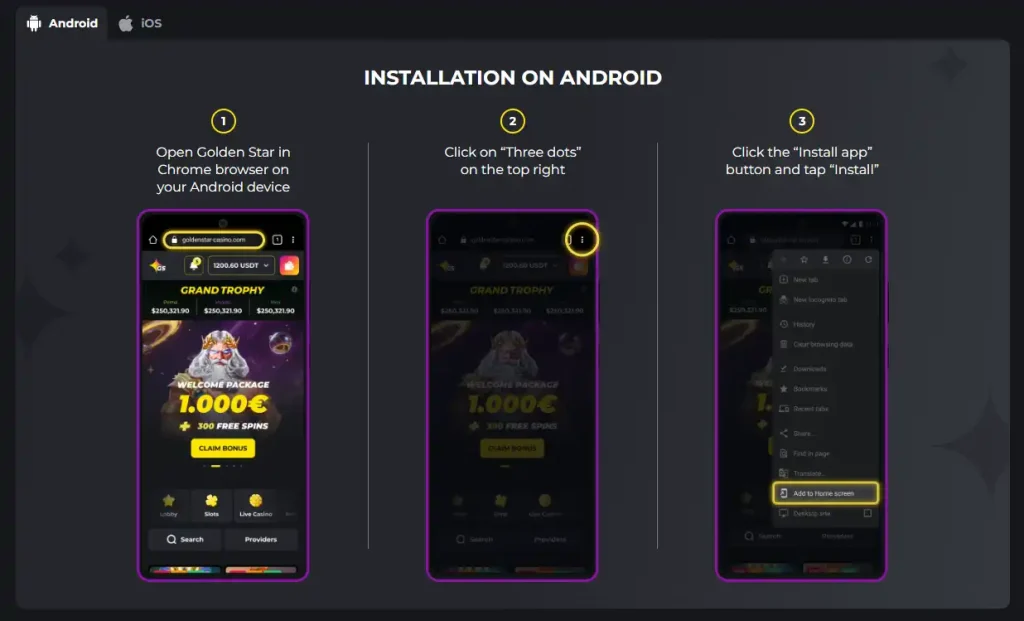
The official install page presents Android and iOS-labelled browser installation rather than a separately verified native store download.
Golden Star currently provides an install-from-browser mobile experience rather than a separately verified native App Store or Google Play package. Its official install page is labelled for both Android and iOS, and the Android instructions explicitly tell users to open Golden Star in Chrome, use the browser menu and tap “Install app”. The casino can also be used directly through a mobile browser, so installing the web app is optional rather than required for mobile play. For an Australian reader, the useful choice is therefore installable web app versus ordinary browser access, not “app versus no mobile casino”. Installation can make launch access more convenient, but it does not change account eligibility, legal status or the underlying games and account rules.
Is there a Golden Star app?
Yes, in the practical sense that Golden Star provides an installable mobile experience. The key distinction is distribution. The current official page shows a browser-based install flow, which is consistent with a progressive web app or similar installable web experience. No separate native binary distributed through Apple’s App Store or Google Play is currently verified.
That distinction matters because casino review sites often use the word “app” loosely. A browser-installed app can create a home-screen icon and launch in an app-like window without being downloaded from a native store. Calling that a verified App Store or Google Play app would add a claim the current evidence does not support.
Current Android installation flow
Golden Star’s official install page currently gives three Android steps:
- Open Golden Star in the Chrome browser on the Android device.
- Open the three-dot browser menu in the top-right corner.
- Choose “Install app” and confirm the installation.
Those instructions are first-party and current as of this check. Because browser interfaces can change, the exact wording or menu placement can vary by Chrome version or device manufacturer, but the page’s core method is clearly browser installation rather than a store listing.
What about iPhone and iPad?
The same official install page has an iOS-labelled section, which confirms that Golden Star presents an installation path for Apple mobile devices. The official page does not provide a verified native App Store listing or package.
For that reason, the accurate description is that Golden Star offers an iOS-labelled installable web experience. If the browser presents an add-to-home-screen or installation control, follow the on-device browser instructions rather than searching for an unverified native app name in a store.
PWA-style installation versus mobile browser
| Question | Installed web app | Mobile browser |
|---|---|---|
| How you launch it | From a home-screen or app-style shortcut after browser installation. | Open the browser and navigate to the official site. |
| Separate native store download verified? | No. | Not needed. |
| Underlying Golden Star service | Web-based Golden Star experience. | Web-based Golden Star experience. |
| Updates | Web content can update without a conventional native-app update cycle. | Web content loads through the browser. |
| Storage commitment | Generally lighter than a full native game client because it is web-based. | No installed shortcut is required. |
| Best for | Users who want a direct home-screen launch. | Users who prefer not to install anything. |
The choice is mainly about convenience and device preference. Installing the web app does not create a different casino account, a different cashier or a separate game catalogue.
Can you play Golden Star in a mobile browser?
Yes. Mobile browser use is supported, and Golden Star’s current website is accessible through mobile-oriented pages as well as the normal web interface. The official English-Australia locale also remains available at the time of this check.
That means an Australian reader does not need to install the browser app simply to inspect the site on a phone. Opening the official website in a modern mobile browser is enough to reach the web experience. From there, the available account, cashier and game functions depend on the same service rules as the broader site.
What carries over to mobile?
The mobile site exposes the same broad Golden Star navigation concepts that appear on desktop, including casino content, promotions and account access. The current Australian-locale page also shows game categories such as slots, live casino, crash games and jackpot games.
For a closer look at the catalogue itself, use the Golden Star games. If live dealer play is the main reason you are considering mobile, the Golden Star live casino focuses on the current live-game categories and providers rather than app installation.
This mobile page does not promise that every individual game performs identically on every phone. Game availability, screen layout and performance can depend on the provider, browser, device and account context.
Login, registration and installation are separate questions
An installed icon can make it quicker to open Golden Star, but it does not change registration rules or jurisdictional eligibility. A mobile interface is simply another way to reach the same service.
If you are evaluating account creation, read the Golden Star registration separately. That page covers account setup and Australia-specific registration evidence. Do not treat the existence of an Australian-language page, an AUD display or an install button as proof that an account can be opened from a particular location.
How to install more safely
- Start from the verified official Golden Star domain: https://goldenstar-casino.com/.
- Use the site’s own install page or the browser’s built-in installation control.
- Do not install an unrelated APK or profile from a third-party download page merely because it uses the Golden Star name.
- Keep the phone operating system and browser updated.
- Protect the device with a screen lock and do not save casino credentials on a shared phone.
- Before entering credentials, check the domain in the address bar rather than relying only on an icon or page design.
These are generic device-security practices. This guide does not claim Golden Star offers biometric login, two-factor authentication or any other account-security feature that has not been verified.
Does installation save space?
A browser-installed web app usually avoids the large package size associated with graphics-heavy native apps because the service remains web-based. The exact local storage used can still vary with browser data, cached assets and device settings, so this page does not publish a fixed megabyte figure.
If storage is a concern, the normal mobile browser route is the simplest option because it requires no persistent home-screen installation at all. If quick launch matters more, installing the web app provides a direct shortcut without changing the underlying Golden Star account.
Updates and version management
A major advantage of a web-based casino interface is that much of the service is delivered from the website. Users do not need to manage a conventional native-app version number for every site content update. Browser components and cached assets can refresh as the web service changes.
This also means that troubleshooting should start with basic web steps: confirm the official domain, refresh the page, update the browser and, if needed, remove and reinstall the home-screen web app. There is no verified native-store release history to use as a version reference.
When installation is worth it
The installed web app is most useful for someone who returns frequently and wants Golden Star one tap away from the home screen. It removes the small routine of opening a browser, finding a bookmark and navigating to the site. Because the experience remains web-based, the installed shortcut is mainly about launch convenience rather than access to a separate set of features.
For occasional use, the browser can be the cleaner choice. It leaves no dedicated home-screen shortcut and makes the source domain obvious each time the site is opened. Readers who compare several casino sites may also prefer browser bookmarks because they keep all web services in one place rather than filling the device with installed web shortcuts.
Neither option is automatically more secure. Security depends more on using the correct domain, keeping the device and browser updated, protecting account credentials and avoiding unofficial downloads. Choose the format that fits your device habits, then apply the same account-safety checks either way.
Basic troubleshooting for the web app
If the installed shortcut stops opening correctly, first test the official Golden Star site in the regular browser. If the normal site loads, the problem can be isolated to the local shortcut, cached data or browser installation state rather than to the entire service.
Next, update the browser, close and reopen it, and retry the official install page. If necessary, remove the home-screen web app and install it again from the verified domain. Avoid solving an installation problem by downloading an APK or configuration profile from a third-party site, because that changes the trust path and introduces a source that has not been verified as an official Golden Star distribution source.
If both the installed experience and the normal browser fail, the issue is broader than the shortcut itself. At that point the useful checks are network connectivity, browser compatibility and whether the official site is currently reachable from the device. This page does not infer account status from a technical loading problem.
Mobile feature checklist
- Official browser-install page: verified.
- Android-labelled installation steps: verified.
- iOS-labelled installation path: verified.
- Direct mobile-browser use: verified.
- English-Australia site presentation: verified.
- Native Google Play distribution: not verified.
- Native Apple App Store distribution: not verified.
- Biometric login or 2FA: not claimed without evidence.
Which option makes more sense?
Use the mobile browser if you want the lowest-friction option and do not care about a dedicated home-screen icon. Use Golden Star’s browser-install flow if you visit the site often and want a faster launch point. In both cases, you are using the same web-based Golden Star service rather than two separate casino products.
The install route is therefore a convenience decision, not an eligibility or legality decision. If you want the broader brand assessment, return to the Golden Star Australia review.